

Last Updated on March 3, 2026 Sarah Gayda
Email remains one of the most critical business record types in Microsoft 365. Contracts, approvals, client communications, regulatory discussions, and operational decisions are often finalized in Outlook — yet in many organizations, email is still managed as unstructured mailbox content.
Without structured email metadata, governance becomes inconsistent, retention becomes risky, and AI tools like Microsoft Copilot struggle to retrieve meaningful context.
If your organization is serious about compliance, defensibility, and AI readiness, email metadata must become a foundational part of your document management strategy.
What Is Email Metadata?
Email metadata is structured information that classifies and describes an email beyond basic properties like sender, subject, and sent date.
Standard Exchange metadata includes:
- To / From
- Subject
- Sent date
- Attachments
But enterprise governance requires more meaningful, business-aligned metadata such as:
- Matter ID
- Client name
- Project code
- Document type
- Retention category
- Sensitivity classification
- Record status
When emails are saved with structured, SharePoint-aligned metadata, they become metadata-driven email records — not just mailbox messages.
Why Email Metadata Matters for Governance
Without structured metadata:
- Emails are difficult to retrieve across workspaces
- Retention may not align to business context
- Compliance audits become harder
- Legal discovery becomes riskier
- AI tools lack structured signals
Email metadata enables:
- Consistent classification
- Defensible retention
- Faster search and filtering
- Cross-platform governance alignment
- Improved AI reasoning over content
In Microsoft 365 environments, metadata is what connects Outlook activity to SharePoint governance controls.
From Mailbox Storage to Metadata-Driven Email Records
Many organizations rely solely on mailbox retention policies or Microsoft Purview rules. While helpful, these often operate at a broad policy level rather than applying contextual, business-specific metadata.
Metadata-driven email records go further.
When an email is saved to SharePoint with structured metadata:
- It inherits content types
- Required metadata can be enforced
- Retention labels align with governance policy
- Records are managed consistently across Teams and SharePoint
This transforms email from isolated mailbox content into governed enterprise records.
How Colligo Supports Structured Email Metadata in Microsoft 365
Colligo provides two complementary approaches to capturing and managing email metadata:
- Email Manager – Outlook metadata prompting and user-driven capture
- Auto-File – Scheduled automated email capture at scale
Together, they support both guided classification and “set it and forget it” automation.
Outlook Metadata Prompting with Colligo Email Manager
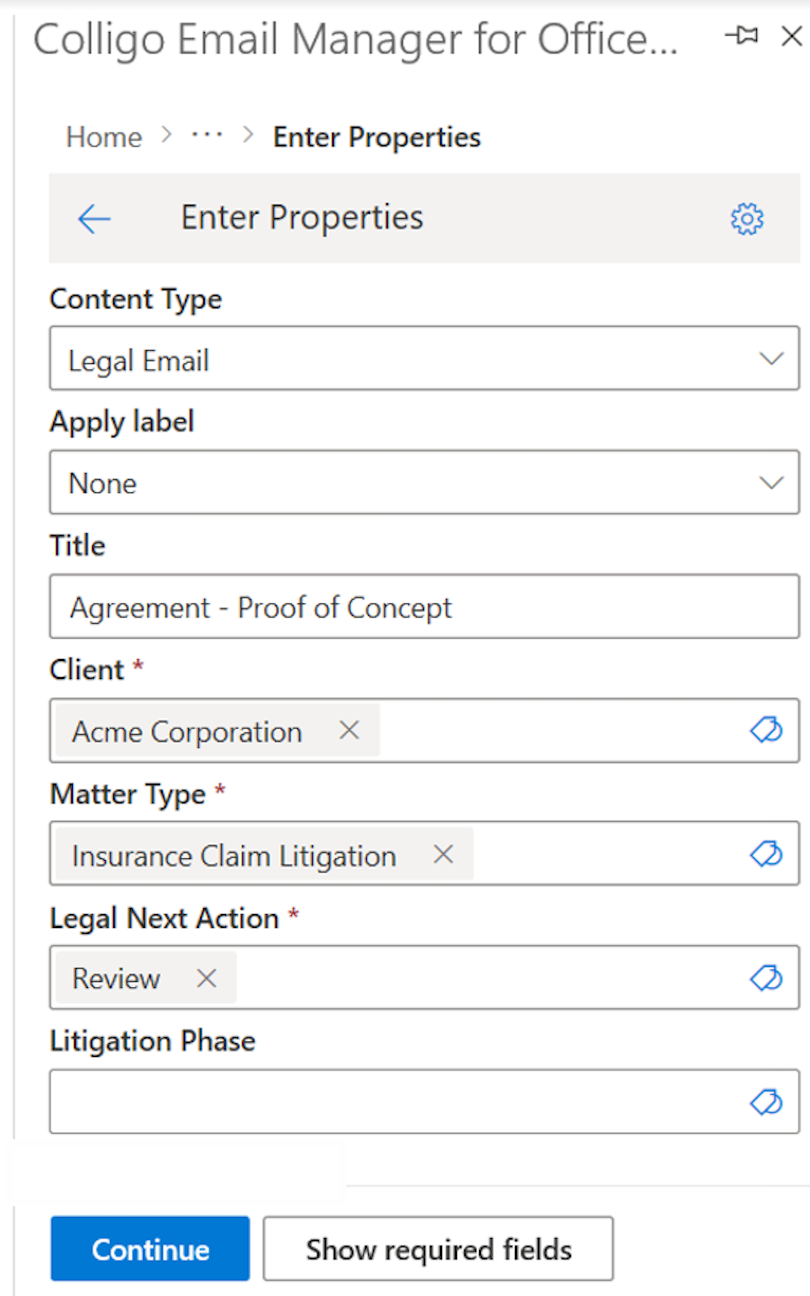
Colligo Email Manager enables users to save emails from Outlook to SharePoint while applying required metadata aligned to your governance framework.
This is known as Outlook metadata prompting.
How It Works
When a user saves an email:
- Colligo suggests a filing destination based on configured rules.
- The appropriate content type is applied.
- Required metadata fields are presented.
- The user confirms or adjusts metadata.
- The email is saved as a metadata-driven email record in SharePoint.
This approach ensures:
- Metadata accuracy at the point of capture
- Alignment with SharePoint governance
- Enforcement of required fields
- Reduced misclassification risk
This model represents automated capture with human-in-the-loop classification — where automation suggests, and the user confirms.
What Metadata Can Be Captured?
Colligo extracts and supports standard and extended email metadata fields.
This includes:
- Sender
- Recipients (To/CC/BCC)
- Subject
- Sent date
- Received date
- Attachment names
- Conversation ID
And, importantly, business metadata such as:
- Matter or project
- Client
- Document type
- Retention category
- Custom SharePoint fields
Email Metadata Fields Supported by Colligo for Outlook Metadata Prompting and Metadata-Driven Email Records
| Email Metadata | SharePoint Column Name | Type |
| Attachment | Attachment | Yes/No |
| Bcc | Bcc | Text (single or multi-line) |
| Bcc-Address | Bcc-Address | Text (single or multi-line) |
| Bcc-Type | Bcc-Type | Text |
| Categories | Categories | Text |
| Cc | Cc | Text (single or multi-line) |
| Cc-Address | Cc-Address | Text (single or multi-line) |
| Cc-Type | Cc-Type | Text |
| Conversation | Conversation | Text |
| From | From | Text (single or multi-line) |
| From-Address | From-Address | Text (single or multi-line) |
| From-Type | From-Type | Text |
| Importance | Importance | Number |
| Received | Received | Date/Time |
| Received-UTC | Received-UTC | Date/Time |
| Sensitivity | Sensitivity | Number |
| Sent | Sent | Date/Time |
| Sent-UTC | Sent-UTC | Date/Time |
| Signed By | Signed By | Text |
| Subject* | Subject | Text
*Note: The email subject will be copied to the Title column by default |
| To | To | Text (single or multi-line) |
| To-Address | To-Address | Text (single or multi-line) |
| To-Type | To-Type | Text |
Automated Email Capture with Auto-File
For organizations that need automation beyond user-driven filing, Colligo offers Auto-File.
Auto-File enables scheduled, automated email capture from Outlook to SharePoint.
It can:
- Run daily, weekly, or monthly
- Copy or move emails
- Capture attachments
- Apply metadata and labels
- File content to governed SharePoint locations
This is particularly valuable for:
- Shared mailboxes
- High-volume teams
- Compliance archiving
- Departmental auto-filing
- Ensuring consistent capture without relying on end users
Auto-File complements Email Manager by providing automation at scale, while still supporting metadata-driven governance.

Semi-Automated Governance vs. Black-Box Automation
Some email capture tools rely on fully automated, opaque classification — often referred to as “black-box automation.”
Black-box automation typically:
- Classifies without user visibility
- Applies metadata without confirmation
- Hides rule logic
- Risks silent misclassification
Colligo’s approach combines:
- Rule-based suggestions
- Outlook metadata prompting
- User confirmation
- Transparent governance controls
This balance between automation and human validation improves both accuracy and defensibility.
For regulated industries, explainable classification is often preferable to fully autonomous systems.
Why Email Metadata Improves AI and Copilot Outcomes
AI tools such as Microsoft Copilot perform best when content is structured and classified.
Rich email metadata enables:
- More precise retrieval
- Better contextual reasoning
- Reduced hallucination risk
- Clearer differentiation between record types
When emails are saved as metadata-driven email records, AI systems can distinguish between:
- Contract approvals
- Client communications
- Regulatory discussions
- Informal internal exchanges
Structured metadata improves both governance and AI reliability.
For more, read Why Is Metadata Important in the Age of AI? Or view our webinar How to Make Metadata Your Secret Weapon in the Age of AI.
Email Metadata as a Strategic Foundation
Email metadata is not optional in modern Microsoft 365 environments.
It is foundational to:
- Governance
- Compliance
- Retention
- Audit defensibility
- AI readiness
Through Outlook metadata prompting in Email Manager and scheduled automated capture with Auto-File, Colligo enables organizations to transform email into structured, governed enterprise records.
If your document management strategy does not include structured email metadata, it is incomplete.
Email Metadata, Automation, and Governance FAQs
Metadata-driven email records are emails saved with SharePoint-aligned metadata, enabling consistent retention, classification, and governance.
Automated email capture refers to rule-based or scheduled processes that move or copy emails to SharePoint with metadata applied. Colligo Auto-File enables this on a recurring schedule.
Colligo combines rule-based automation with user confirmation (human-in-the-loop classification) to improve accuracy while maintaining compliance.
Outlook metadata prompting is the ability to require users to apply structured SharePoint-aligned metadata when saving emails from Outlook. Native Outlook does not provide this capability. Colligo Email Manager enables metadata prompting directly within Outlook, ensuring emails are saved as metadata-driven records with required governance fields applied.
Colligo enables automated email capture through configurable rules and scheduled Auto-File processing, while maintaining governance control through structured metadata and optional human-in-the-loop validation. Unlike fully automated “black-box” systems, Colligo ensures emails are saved to SharePoint with required metadata, content types, and retention labels aligned to Microsoft 365 governance policies.
Email metadata provides structured context that improves how Microsoft Copilot and other AI tools retrieve and interpret content. When emails are saved with SharePoint-aligned metadata—such as matter, client, document type, and retention category—AI systems can distinguish between business records and general correspondence, improving accuracy, compliance, and search precision.